SASSA R370 Application
The SASSA R370 application allows unemployed and financially vulnerable South Africans who do not receive other social grants, UIF, or NSFAS, and have no other source of income. The SRD grant is managed by the South African Social Security Agency (SASSA) and implemented under the oversight of the Department of Social Development (DSD). This R370 grant is administered in accordance with Section 32 of the Social Assistance Act, 2004 (Act No. 13 of 2004), and the regulations require the concurrence of the Minister of Finance.
Here, we explain how to apply, check your SRD application status, understand the meaning of each status, determine when payments are made, resolve delays, and submit an appeal if your application is declined.
- Update 2026: SASSA has increased the SRD grant amount from R350 to R370 for beneficiaries who rely on this support for essential needs.
Eligibility Criteria for SRD R370 Grant
You generally qualify for the SASSA R370 grant if you meet the SRD eligibility criteria.
- Your age should be between 18 and 60 years old.
- Unemployed, have no other source of income, or fall under the low-income R624 threshold limit for Means Test.
- You are a South African citizen, permanent resident, refugee, or asylum seeker with valid permits.
- Not receive any other SASSA grants, UIF (Unemployment Insurance Fund), SARS (South African Revenue Service), or NSFAS (National Student Financial Aid Scheme).
Documents Required for SRD Grant Application
To apply for the SASSA R370 grant, you will need to provide the following information.
- South African Identity Number or Department of Home Affairs Refugee/Asylum Seeker Permit Number.
- Name and Surname as captured in the original Identity Document.
- Gender and Disability Status.
- Contact details, including an active cell phone number.
- Personal banking details for direct monthly payment, or choose another payment method such as the SASSA card.
- Residential Address.
Important: Always use your own phone number when applying for the SRD R370 grant. If you use someone else’s number (a friend, relative, or spouse) and later cannot access the OTP or SMS messages, you will need to request SASSA change phone number to manage your SRD grant.
SASSA R370 Application Process Step by Step
To apply for the SASSA SRD R370 grant, it is important to understand the complete application process to avoid delays, rejections, or missed payments. SASSA provides multiple ways to submit your R370 application, including the online SRD portal, WhatsApp, GovChat, and in person at a local SASSA office. Here we start with the online process. Make sure you have your South African ID number, active mobile phone number, and banking details.
Visit the official SRD portal
Go to the SRD portal using your phone or computer. https://srd.sassa.gov.za/
Start your SRD R370 application
Click on the relevant option based on your citizenship status (South African Citizen, Permanent Resident, Asylum Seeker, or Special Permit Holder).
Enter your personal details
Provide your full name and surname as they appear on your ID, along with the cellphone number you will use for all SASSA communication.
Receive and verify OTP
You will receive a 6-digit One-Time Pin (OTP) via SMS. Enter the OTP on the website and click Verify PIN.
Accept terms and consent
Read and accept the declaration and consent forms, allowing SASSA to verify your income and personal details.
Submit payment details
Choose how you want to receive your SRD grant money from SASSA. You can select bank option or SASSA card.
- For bank payment option, submit your bank details, your bank name, account number.
- Other payment methods, select the SASSA card option, that you can use at Post Office and retail points.
Submit your complete SRD application
Once completed, submit your SASSA SRD R370 application and wait for confirmation via SMS. This message will include your application reference number, also known as the Application ID.
Once your application is successful, you will receive a confirmation message on your mobile number, indicating an active SRD grant application.
Asylum Seekers or Special Permit holders will receive a Payment ID to collect the grant payment at Pick ‘n Pay.
Important: If you recieve a message for “Referred Status” you have to visit the SASSA office in person to complete your biometric verification.
Other Ways to Apply for SASSA SRD R370 Grant
If you cannot apply through official portal, SASSA provides alternative ways to submit your SRD R370 application. These options are helpful when official website is down and when applicants need in-person assistance.
SASSA WhatsApp for SRD Grant Application
The official SASSA WhatsApp number is 082 046 8553. This is a valid and active for SRD grant applications.
- Save the number 082 046 8553 on your phone
- Send “Hi” or “SASSA” to start the chat
- Select Apply for SRD and follow the prompts
- Enter your ID number and mobile phone number
- Complete the verification process to submit your application
Important: The phone number you use must be registered in your own name. SASSA’s verification system cross-checks your phone number against your ID to prevent fraud. Using someone else’s number can cause delays or rejection.
SASSA SRD R370 Application via GovChat
GovChat is another official platform supported by SASSA for SRD services.
- Open the GovChat app.
- Search for SASSA SRD Grant.
- Select the option, Apply for SRD Grant.
- Enter your personal details as requested.
- Complete and submit your SRD R370 application
Apply for SRD Grant in Person at the SASSA Office
Local SASSA offices help you apply for the any social grant and SRD R370 grant in person.
- Visit your nearest SASSA local office.
- Bring your South African ID.
- Provide an active mobile phone number for SMS verification.
- A SASSA official will help you complete the SRD R370 application.
- Once submitted your SRD application, you will need to complete your biometric verification.
These application methods ensure that all eligible applicants can apply for the SASSA SRD R370 grant, even without online access.
How Long Does SASSA Approval Take for the SRD R370 Grant
After submission, SASSA processes your SRD R370 grant application, which can take 30 to 90 days from the date of submission. Once your application has been reviewed and processed, you will be informed of the outcome via SMS or email, depending on the contact details you provided.
What Happens after you Apply for SASSA SRD R370 Grant
After you submit, SASSA typically runs checks like:
- Identity verification (DHA records)
- Means test/income verification
- Bank account verification (when bank details are provided)
- Possible cross-checks with NSFAS, UIF, SARS benefit databases
Check SASSA SRD R370 Application Status
Checking your SASSA SRD R370 application status is important to confirm whether your application is approved, pending, or declined. It also helps you track monthly grant approvals and see when you will be paid once your application is successful.
- Go to the SRD portal srd.sassa.gov.za or srdstatus.co.za
- Enter yur South African ID number and the phone number used for the SRD application.
- Click the “Check Status” button and view your application status.
- The system will display your application status, grant approval, and payment dates.
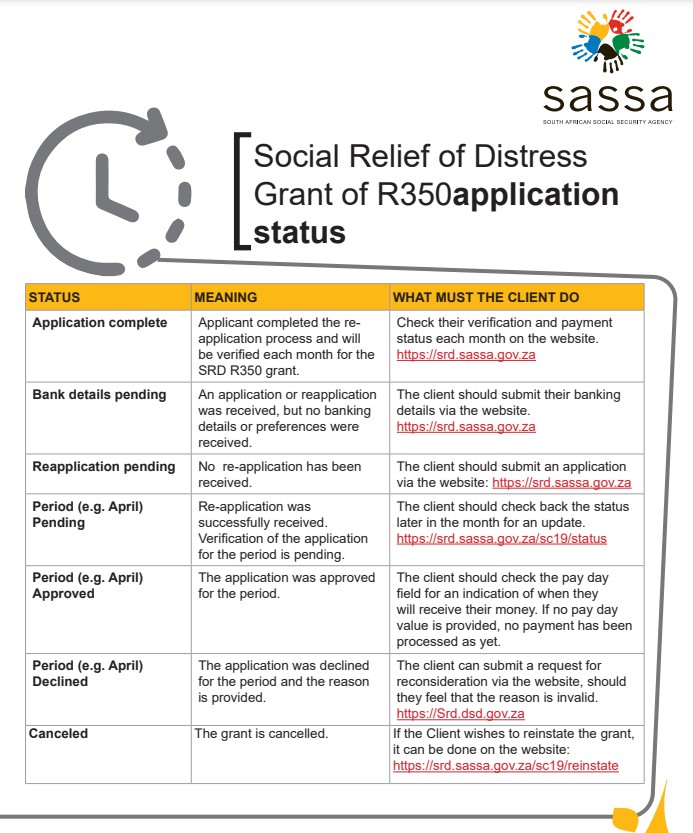
Here is what each SRD status usually means and what you should do.
Application Status shows Pending
If your application is pending, it means that the SASSA verification process is taking place. This process verifies your identity, means test, and bank details. A pending status usually indicates that your application is still being processed and has not been rejected.
- SASSA Verification is still underway.
- SASSA is waiting for a system response from another database.
- Your details need internal review.
Application Approved
Application approved status means your SRD grant application met the SASSA requirements and passed verification. You’ll now be considered for payment each month. You will receive your SRD grant payment on the specific payment dates for the month.
- Confirm bank details are correct.
- Keep phone number active for OTP/communications.
- Check payment dates as listed above in this article.
Application Declined
Declined means that SASSA has reviewed your application, checked your details, and found that your circumstances did not meet the eligibility criteria for the SRD grant. Common reasons for a declined status include:
- Income/means test exceeded (income detected above threshold)
- NSFAS/other government support detected
- UIF detected
- Identity verification failed
- Bank details invalid or belong to someone else
- Already receiving another grant
- Deceased status on Home Affairs (data mismatch)
If the reason is eligibility-related (income/UIF/NSFAS) but you believe this is incorrect, submit an appeal.
You can submit an SRD appeal online at the official portal. After appeal, the Independent tribunal reviews your appeal and provide a final outcome. Once your appeal is successful, your grant will be approved and paid by SASSA.
SASSA Status Referred
Referred means your application could not be automatically verified and has been sent for further checks for the following resons.
- Identity details don’t match across databases.
- Bank account cannot be verified to the applicant.
- Conflicting results from income/UIF/NSFAS/Home Affairs checks.
- Missing/incorrect contact details causing OTP failures.
In such cases, SASSA needs to verify your identity. You can resolve this by visiting a SASSA regional office to complete biometric verification. Once completed, your identity will be confirmed, and your grant status will be updated accordingly.
SASSA Shows SRD Grant Canceled
Canceled means the SRD application is no longer active and will not be processed for future payments.
- User requested cancellation (self-cancel).
- Duplicate application detected.
- Ineligibility confirmed over time.
- Failure to verify details repeatedly.
- System cleanup/record updates (rare, but users see this and panic).
If you cancelled your application by mistake, you can submit a SASSA reapplication for SRD R370 for review. It will processed like a new application and approved once your eligibility is confirmed and information is verified.
How you Get Paid for Approved SRD Grant
Once your SRD R370 application is approved, SASSA will pay the money using the payment method you selected during your application. Payments are made monthly, but you must check your status each month to confirm approval and payment.
For approved beneficiaries, SASSA schedules SRD grant payments in the last week of each month, as announced in the official SASSA payment dates.
You will receive your SRD grant payment through one of the following available methods.
Bank Account
If you selected a bank account, your SRD grant is paid directly into your personal bank account. Funds usually reflect on the same day or within 1–3 working days. Make sure the bank account is in your own name to avoid delays.
SASSA Card
If you do not have a bank account, you can select the SASSA card option during your application to receive payment via SASSA card. You will receive an SMS with instructions on how and where to collect your money for each month.
You can use your SASSA card at Postbank ATMs, Post Office branches, and authorized retail outlets. If you want to collect your grant in cash at retailers such as Pick n Pay, Shoprite, Checkers, or Boxer, always bring your ID.
Important Payment Notes
- SRD grants are not paid automatically every month, you must be approved for each month
- Always check your SRD status to confirm payment
- SASSA will never ask for your bank PIN, OTP, or CVV.
If your payment is delayed, contact your bank and contact SASSA through official channels only.
Fix common SASSA R370 application problems
Pick the problem that matches what you’re seeing.
Common reasons people are declined so you can avoid it
These are the most frequent “pain point” triggers:
- Income source detected (bank verification reflects deposits/earnings above the threshold used for SRD)
- UIF/other benefits flagged
- Identity details don’t match Home Affairs/bank records
- Duplicate application or incorrect details
- Bank account not in your name (name + ID must match)
OTP not received for log in or complete application
Most common causes:
- weak network signal
- wrong cellphone number used in application
- SIM swap / lost SIM
- SMS blocking/spam settings
What to do:
- 1) Confirm your phone has signal and can receive other SMS.
- 2) Restart your phone and request OTP again (don’t spam requests too fast).
- 3) Make sure you’re using the same number you applied with.
- 4) If you lost the SIM, replace it with your network provider (RICA) so you regain the same number.
Important: If someone else controls the number, you may be locked out later. It’s worth fixing this properly.
Identity verification failed
Common causes:
- name/surname spelling doesn’t match ID records
- incorrect ID number
- using a nickname instead of official names
What to do:
- Re-check every character of your ID number.
- Ensure names and surname match exactly as per ID.
- If you consistently fail verification, use the official contact to escalate:
- https://srd.sassa.gov.za/sc19/contact
Bank details pending/failed or payment rejected
This is a top reason people stay unpaid even after approval.
Common causes:
- bank account is not in your name
- ID number doesn’t match bank profile
- wrong account number/branch code
- account closed, frozen, or restricted
What to do:
- 1) Use a bank account registered in your own name.
- 2) Double-check ID number and personal details match your bank profile.
- 3) Re-submit banking details on the SRD portal https://srd.sassa.gov.za/
- 4) Wait for verification to complete, then check status again.
Phone number changed / lost SIM
Why it’s serious: SRD uses OTP to protect your application. If you can’t receive OTP, you can’t manage your details or fix issues quickly.
What to do:
- If possible, recover the same number via your mobile network (SIM replacement).
- If you must change numbers, follow the official SRD process on the portal and/or contact SRD support:
- https://srd.sassa.gov.za/sc19/contact
Avoid: Paying “agents” to change your number, this is a common fraud route.
SASSA SRD R370 Application Declined
When you see “Declined,” don’t stop there. Read the reason.
Common decline reasons users see:
- Income source identified (means test)
- UIF registered/received
- NSFAS/other support flagged (where applicable)
- Alternative income detected via bank checks
- Identity mismatch or duplicates
What to do next:
- If the reason is correct: you may not qualify for that period.
- If the reason is wrong: appeal (step-by-step below).
SRD Grant Approved but no SMS and No Payment Received
What to check first:
- 1) Status page shows Approved for the specific month/period.
- 2) Banking details show verified (not pending/failed).
- 3) You have not changed phone numbers or banking details mid-process.
If all looks correct, wait for the next payment run and keep checking status. If it continues, contact SASSA helpline 0800 60 10 11.
How to appeal a declined SASSA R370 application (step-by-step)
Appeals are your main tool if you were declined unfairly or due to incorrect verification.
Official appeals portal: https://srd.sassa.gov.za/appeals/appeal
When you should appeal
Appeal if:
- you have no income (or below the threshold) and still got “income source identified”
- UIF/benefit is flagged but you’re not receiving it
- decline reason is clearly incorrect
- identity/banking mismatch caused a wrong decision and you corrected it
Steps to submit an appeal
- 1) Open: https://srd.sassa.gov.za/appeals/appeal
- 2) Enter your ID number and cellphone number
- 3) Select the month/period and the decline reason
- 4) Submit the appeal and keep confirmation proof
- 5) Check appeal outcome regularly
What improves your appeal outcome
- Your personal details match official records
- Banking details are correct and in your name
- You appeal for the correct period/month
Do you need to reapply for SRD R370? (and when to update details)
Do I need to reapply?
Sometimes SRD continues with ongoing assessments, but your status can change month to month due to verification. If your application was canceled or you started fresh, you may need to reapply via the official portal.
When you must update details
Update your details when:
- you changed bank accounts
- your bank account was closed/frozen
- your phone number changed (try to keep the same number if possible)
- your personal details were captured incorrectly
Official SASSA Contacts
You can contact SASSA at toll free helpline number 0800 60 10 11. You will need to verify your identity to receive any help. You can also use the official email grantenquiries@sassa.gov.za or SRD@sassa.gov.za for official assistance.
- your ID number
- the cellphone number used for the application
- screenshots of your status result (pending/declined/approved)
- the exact decline reason text (if declined)
This makes support faster and reduces back-and-forth.
SASSA R370 application FAQs
Can I apply without a bank account?
Many applicants do, but banking tends to be the most stable way to receive payment. If you don’t have a bank account, follow the portal’s available payout options and keep your phone number active for OTP and updates.
I was on R350 before. Do I need to apply again?
Often the SRD grant continues with updated amounts and ongoing checks, but it depends on your current SRD record and status. Check your status on the official portal and confirm whether your application is active.
Why does my status change each month?
Because SRD is assessed by period. Your eligibility can change if:
- your income changes
- verification finds new information
- banking/identity checks fail for that month
What if I’m unemployed but still declined?
That happens a lot due to incorrect flags (income/UIF) or data mismatches. Your next step is to appeal:
- https://srd.sassa.gov.za/appeals/appeal
Important for SASSA R370 Grant Application
The SASSA R370 application allows unemployed and financially vulnerable South Africans. To apply correctly, you ,must go through the official portal link. Once submitted your application, you need to check your status for approval and payment dates.
- Apply/manage your SRD R370 here: https://srd.sassa.gov.za/
- If declined, appeal here: https://srd.sassa.gov.za/appeals/appeal
- Most delays come from OTP access, identity mismatch, or bank details not matching your ID
- Don’t use paid agents, don’t share OTPs, and avoid scam links
I would like to get my 350 to provide my self on behalf of unemployment
Thanks a lot I obbrigate 🙏
HI I will like to get the r350 money so that it could help me finecially
I would like to receive the 370 so that it could help me
I would like to apply for 350 because Uhm not working n Uhm struggling
I lost my sim card & forget numbers too so i need help
Plz I need this sassa
Is it possibility for Asylum seeker to aply for R350 grant
I am so glad sassa called.,yesterday. My inner feeling tells me that this could be my Year. TX GOD
hi am still waiting on my new phone number am waiting now sinces 2 months and heard nothingg yet my cellphone number is 081405834
My sassa is decline